 Sandbox
Minecraft: Cobblemon (Pokémon Reforged) Mod — Getting Started
The Cobblemon mod (often called Pokémon Reforged) is one of the most beloved ways to blend Minecraft with the monster-collecting formula you grew up with. It reworks a lot of the game's behavior — most notably, hostile monsters no longer spawn at night — and centers everything around catching, training, and battling Pokémon across the overworld. If you ever played something like Seer, the loop will feel instantly familiar: explore, capture, and build a team. Here's how to get rolling.
Installing the Mod and Recommended Add-Ons
Start by dropping the Cobblemon mod into your Minecraft mods folder (Forge or Fabric, depending on the build you grab). Two companion mods are strongly recommended. First, add Pokémon Lucky Blocks — they can drop a Poké Phone, which lets you heal your team on the go and open your ender chest, making field care far easier. Second, install JEI (Just Enough Items) so you can look up every recipe the mod introduces. On a single-player world, also turn on the bonus chest at creation; it hands you a few Poké Balls right away, which matters because crafting balls in the early game is a genuine hassle.
Your First Minutes in the World
Once you spawn, resist the urge to immediately chop trees. Instead, take a moment to read the terrain: different biomes spawn different Pokémon, so where you choose to build decides what you'll meet first. Mining is still worthwhile — several ores remain valuable — but treat exploration as your priority. Because the mod suppresses nightly monster spawns, darkness is no longer dangerous; a bed is only useful for setting your respawn point and, eventually, fighting the dragon. For that reason, also enable keepInventory (no item drop on death): you'll be sprinting across the map constantly, and while your captured Pokémon never drop, the items in your backpack absolutely will.
Picking a Starter
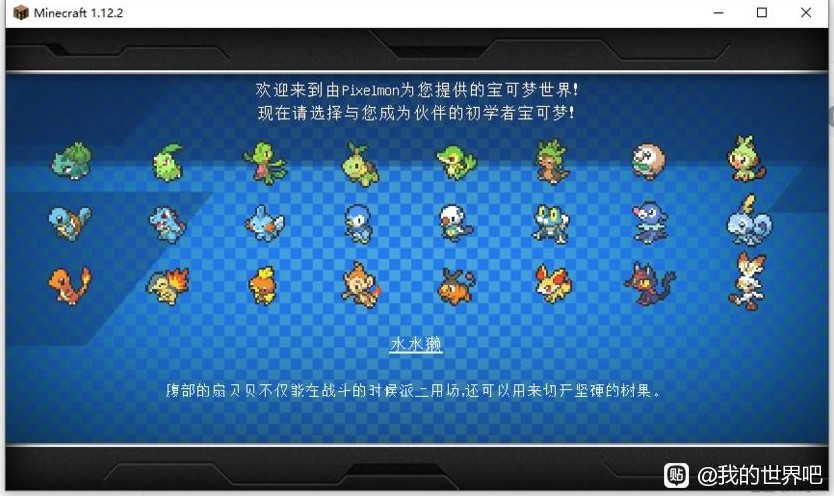
For your first partner, Charizard and a water-type starter (the "Sage Frog" line) are excellent, well-rounded choices that cover both flying and fire pressure plus a reliable water option. Don't stress about a "perfect" pick — the world is full of candidates and you'll build a full team quickly. Early on, though, forget about legendaries: without a Master Ball their capture rates are brutally low, so save those hunts for when you're properly geared up.
A good habit is to carry a small variety of ball types as soon as you can craft them. Basic Poké Balls handle common overworld spawns, while Great and Ultra Balls dramatically improve your odds against tougher or higher-level targets. Status effects help too: a sleeping or paralyzed Pokémon is far easier to catch, so pack a few status-inflicting moves on your lead partner before you go hunting.
Catching Your First Pokémon
Catching works much like the source games. Weaken a wild Pokémon in battle, then throw a Poké Ball — the weaker and lower-level the target, the better your odds. Use the Poké Phone from Lucky Blocks to heal between encounters so you're never stuck with a wiped team. As you travel, you'll spot themed altars in specific biomes: thunder altars appear in savannas, ice altars in snowy plains, fire altars in badlands, and so on. Special structures also dot the land — Pokémon Centers and Marts show up in villages and plains, Gyms generate near settlements, ships sail the oceans, samurai towers stand along coasts and villages, and Ghost Towers lurk in swamps and dark forests. Once unlocked, Ultra Space contains nearly every structure the mod and the base game offer, making it the ultimate late-game playground.
Battling and Beyond
Battles are turn-based and follow familiar type-matchup rules, so building a team with complementary types is the key to tougher fights. Team up with friends in co-op survival and you can trade, compare teams, and tackle dens — which can appear in any biome — together. As you progress you'll unlock cloning, evolution tied to specific times and biomes, and even fusion mechanics for the most dedicated legendary hunters. The mod's depth is huge, but the core loop never changes: explore a biome, fill your ball, and grow your team.
Settling In and Staying Organized
As your team grows, a little base-building pays off. Set up a home near a village so you have quick access to a Pokémon Center for healing and a Poké Mart for supplies — blue-roofed marts are your go-to shop. Keep a chest dedicated to spare balls, potions, and evolution items, because you'll burn through them faster than you expect once the catching bug bites. If you're playing co-op, build your shared base on a plains or village biome so the whole group spawns close to useful structures.
Remember that this mod is a marathon, not a sprint. The first session is about learning the capture loop and securing a starter team; the long game is about hunting altars for rare spawns, clearing dens with friends, and eventually tackling Ultra Space for its concentrated structure generation. Take it biome by biome and the journey stays fun instead of overwhelming.
With the mod installed, a starter in hand, and a few balls in your pocket, you're ready to turn Minecraft into your own Pokémon journey. Happy hunting.
🏷️ Related Tags
🔥 Topics
Fortnite: Chapter 4 / v4.0 Patch Notes — New Weapons, POIs and Mobility
Next →Palworld: Best Team Builds — Crush Every Boss
More “Minecraft” Content
 Sandbox
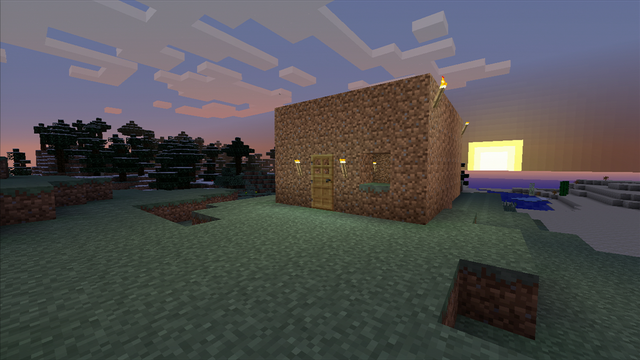
Minecraft: Ten Ways to Survive Your First Night
A ten-step first-night plan for a brand-new Minecraft world: turn logs into tools, raise a sealed shelter before dusk, sleep through the dark, and reach your second sunrise alive.
 Sandbox
Minecraft Redstone Basics: Repeaters, Comparators, and Your First Auto Door
Redstone stops being mysterious once you track two numbers: signal strength, which decays by one every block of dust, and time, which is counted in ticks. This guide explains both properly and then walks you through three builds you can finish tonight and actually reason about: a hidden sticky-piston door, a comparator item filter that triggers on the second item, and a latch you can debug instead of copying.
 Sandbox
Minecraft Modpack Picks: One Each for Tech, Magic and Adventure
A 2026 buyer's guide to Minecraft modpacks: one strong pick each for tech, magic, and adventure, plus hardcore and lightweight options matched to your RAM and your group's style.